Excel WEEKDAY function

Function WEEKDAY
Description Excel WEEKDAY function takes input of a date and returns a number between 1 to 7 representing the day of week. By default, WEEKDAY returns 1 for Sunday and 7 for Saturday.
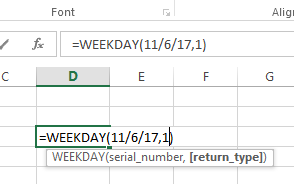
Syntax WEEKDAY(serial_number, [return_type])
serial_number – The date for which you want to get the day of week.
return_type – [optional] A number 1-3 representing day of week mapping scheme. Default is 1.
|
Return_type |
Number returned |
| 1 or omitted | Numbers 1 (Sunday) through 7 (Saturday). Behaves like previous versions of Microsoft Excel. |
| 2 | Numbers 1 (Monday) through 7 (Sunday). |
| 3 | Numbers 0 (Monday) through 6 (Sunday). |
| 11 | Numbers 1 (Monday) through 7 (Sunday). |
| 12 | Numbers 1 (Tuesday) through 7 (Monday). |
| 13 | Numbers 1 (Wednesday) through 7 (Tuesday). |
| 14 | Numbers 1 (Thursday) through 7 (Wednesday). |
| 15 | Numbers 1 (Friday) through 7 (Thursday). |
| 16 | Numbers 1 (Saturday) through 7 (Friday). |
| 17 | Numbers 1 (Sunday) through 7 (Saturday). |
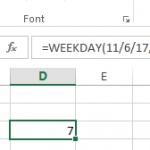
Example: